MERCURY UPDATE | March 17, 2025

We have been so busy making the changes that we have neglected to tell you about all of them. Below is a long list of enhancements and a few bug fixes worth noting since we last shared on 1/27.
As promised, this list of “change log” or list of feature updates and fixes is coming from the same platform that holds our help docs and future feature request board.
Thank you all for all your time providing feedback and patience when there is a bug or missing feature that is an inconvenience. We hope this long list of changes made the last 6 weeks illustrates the potential for where we are going to go in the next 6 months!
FEATURED CHANGES
Featured changes are those that came highly requested and/or have a significant impact on functionality so much so that we are sharing them in advance of making the change.
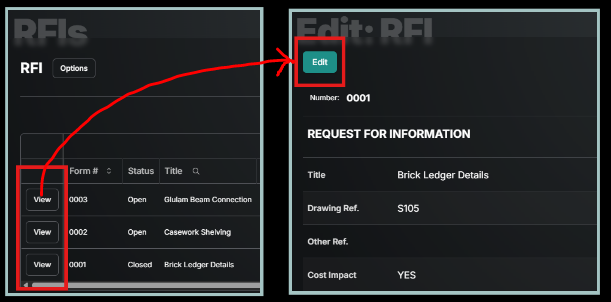
Viewing vs Editing of Forms:
By 03/18/25 all forms will default to view only and then for those with Edit permissions, an Edit button will be available at the bottom right. This means the Edit button down the left side of the tool home screen will be removed. Those without edit permissions nothing will change. This resolves some confusion created by selecting view, but then being allowed to edit, but then not having the save/continue buttons. It also cleans up the view only users like architects who are responding in the assignees area, but only having one button to choose from when completing their response.
Document Folder Nesting & Editing:
Next week (tied to app store review) the documents tool will allow many tiers of folders within folders. Moving documents between folders, and copy individual pages out of documents into a new folder (including private folders, including markups) will be available. This not only adds flexibility but also the option for users who are not administrators to copy documents to their private folders for mark-up.

ENHANCEMENTS AND FIXES
Here are all the changes made, grouped by where they can be found. Please reach out to pdesimone@shoestringvalley.com if you have any questions as to why these changes were made.
PDFs
Enhanced PDF exports now present attachments with clickable links, clear photo numbering, and an organized layout with branded letterhead. Still work to do here!
Improved PDF link extraction and display for more reliable in-document linking.
Daily reports
Added ability to search daily reports by text contained in notes.
Added ability to search companies in Workforce/Manpower.
Added ability to view past daily reports in a table view.
Date and User of last update included at the top.
Improvements to Weather input on mobile devices.
Expanded the form table functionality with support for new weather and manpower inputs
Documents
Folders allow tiers (nesting) coming week of 3/17/25.
Specifications on longer require verification or range and title (no more caution sign).
Document (drawing) Versions can now be titled. For Example: (ASI 01) V2
Uploads
Updated maximum allowed document upload and attachment upload size.
Added ability to upload multiple photos and attachments at the same time.
Administration
Redesigned checklist management for admins for a smoother, interactive experience with updated editing dialogs and drag-and-drop reordering.
Enhanced the project location management interface
Permissioned the Home Screen whiteboard so only project admins may make modifications.
Added User Groups to project directories to simplify adding common collections of users. Currently trialing with distribution lists, soon to be rolled out to all form user inputs.
Mobile
Added a dedicated mobile photo editor for iOS, android version coming soon!
Improved rich text editing experience on mobile.
Now support uploading photos directly to a specific album from mobile.
Updated mobile date-pickers to align better with each platforms standard interface.
Now available in Google Play and Apple Store as Mercury Build, but if you’re in this group you got it installed on your device automatically.
Invites & Login
Added ability to utilize users in project directory even if they haven’t accepted an invite yet. In the directory they will receive a “Pending Invite” badge.
Improved error notifications for invitations, letting the inviter know when the user is already in the project directory, or needs to accept an invite.
After entering their email address, external users now will get emailed a Code to paste it instead of a Link.
Forms and Inputs
Updated Assignee Response timelines to display attachments inline with photo previews and links.
Upgraded Assignee Response timeline view with a toggle to show a full or compact list of responses.
Updated Topics Input (used in meeting minutes) to remove items one meeting after they are marked as “Closed”
Introduced a new time input component with improved formatting.
Form numbers throughout the application are now displayed as four-digit strings with leading zeros.
Introduced a unified actions menu in the form editor, allowing users to distribute, export, and recycle forms with proper permission checks.
Table displays now clearly label previously published but recycled forms for easier identification.
Scoped form-update notifications tighter so that only the creator and current assignee get notified (as well as anyone who intentionally subscribed).
General
Added location information to QC Planner groups.
Tool and category displays now adjust dynamically based on your access rights.
Expanded toast notifications to provide immediate feedback on success or failure of actions.
Updated the Privacy Policy and Terms of Service.
Various bug fixes and improvements.
External user login now emails a Code instead of Link.