MERCURY UPDATE | August 2026

In this addition, you’ll find some significant upgrades to existing tools that have been sought after for a long time. Lots of small fixes and feature upgrades that we hope you agree, will sum to creating a better experience than before. Below are the 50+ changes listed in detail since the last update at the start of July.
Thank you to all who have taken the time to provide feedback. We really are honing in on the solution we had in mind when Mercury was originally launched and that would not be the case without your expertise. “Built by builders” is what will make us successful, so thank you for investing your time into Mercury.
FEATURED CHANGES
Featured changes are those that came highly requested, have a significant impact on functionality, or we thought they were more exciting than the others.
New Feature Early Access
For us software nerds, this is called a Feature Flag. Now, when we make larger changes, we can roll them out project by project or user by user. This allows initial testing and refinement to be done in the real world by a few willing users. That we can tighten things up that could have been missed in our QC process before a full blown launch. When you see Beta or V2 next to a tool here or in our Documents, just use the Contact Support button to let us know you’d like to be a test pilot. From there we will turn it on and you can send us tickets on the refinements you believe are necessary for the best possible solution.
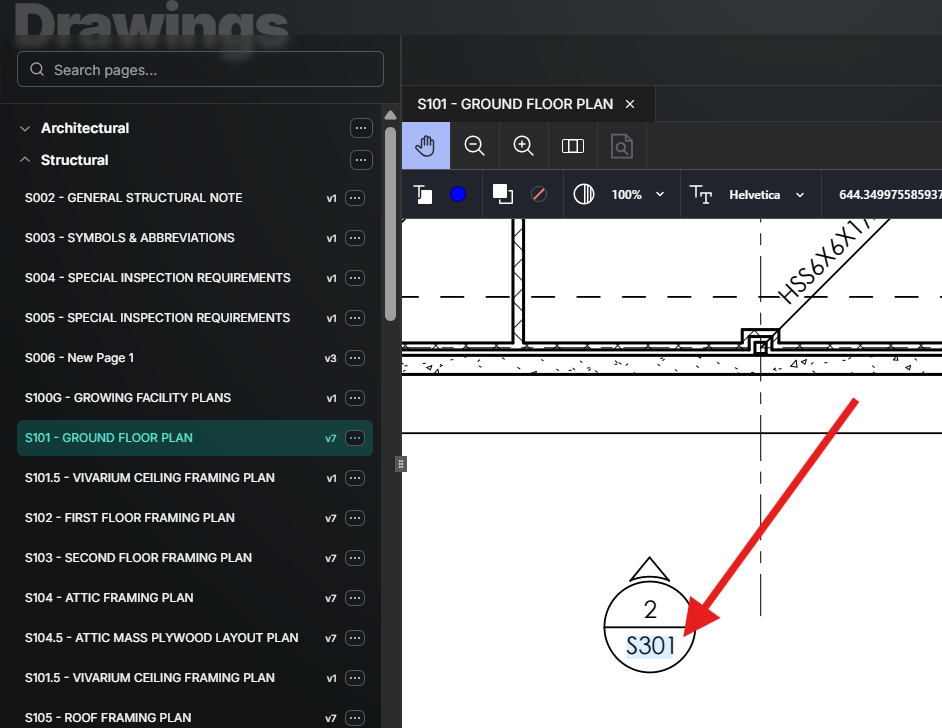
Drawing Hyperlinks
In short, clicking on a detail callout in Mercury takes you to that sheet. Mercury scans drawings for references to other sheets and adds a link. It does not rely on any existing links embedded in the PDF and scans new sheets when they are added or replaced. This applies to both mobile and desktop.
Punch List V2 - Beta
Day one we launched with a very simple punch tool that got the job done, but lacked all the features we had in mind. Punch List V2 is now available in BETA and is a huge leap forward on reducing taps. Just hit that Contact Support button if you’re ready to start punch!
We really focused on the feedback that said punch items need to be created quickly as and then tracked easily. In response, we provided a way to set preset values for repeating items to avoid typing the same information repeatedly, on a small screen, with gloves on. You can also toggle on “Create Next” to immediately start entering the next item after submitting the current one. The tracking can be done by sorting and filtering punch items that can then be shared with anyone on the project. Check out the Punch article in our Docs for the how-to video’s.

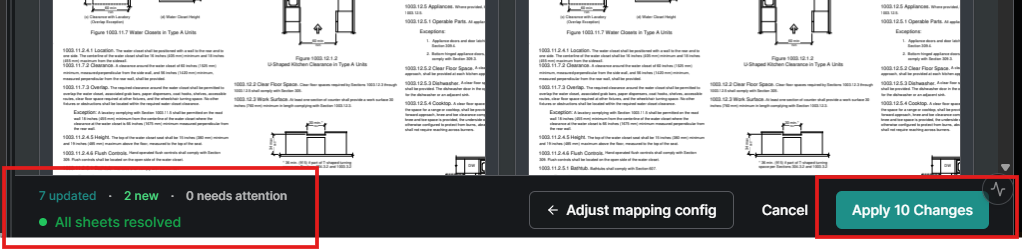
Documents: Upload & Bulk Update V2 - Beta
The bulk update flow got some major upgrades that everyone uploading and updating documents will appreciate. Like Punch V2, this is also behind a feature flag, so Contact Support if you’d like to try it out.
Bookmarks not required. We now offer the ability to select a region on the PDF to use as a page label.
Preview before you commit. When the update process hits a fuzzy match, you now get a preview of the pages in question side by side instead of guessing from the bookmark name alone.
Clean exit. Backing out of an upload mid-process no longer leaves a half-uploaded one-page file sitting in the folder.
The name you type is the name you get. The name entered during upload now carries through and replaces the original file name.
Company Wide Data
For EHS, Quality and Risk there is now a table that combines the data from every project. All the same sorting, filtering, hiding, and view options from the project-level tables apply. You can now see every failed safety or quality observation across the company in the last month and get an answer. See the Company Reporting section of the Reports article.

Daily Reports: Who Wrote It and "My Notes"
On those big jobs there can be 10 or more people making entries in a daily, and finding the two you wrote meant reading all of them. Manpower rows now show the user who made the entry as a column, and notes show the author between the header and the text area without eating into the note space. The Expand/Collapse buttons are now a single toggle, and next to it is a My Notes toggle that filters the daily down to your entries. More in the Daily Report article.

ENHANCEMENTS AND FIXES
Here are more changes made, grouped by where they can be found. Please reach out to pdesimone@shoestringvalley.com if you have any questions as to why and he will name names as to who requested them.
Documents
When switching between document tabs, the current view sticks. That way, when you zoom in on that detail and open another tab, you can return to just that detail and not the whole page.
Fixed the "Something went wrong" error when loading a new set while reordering pages in a large set.
Opening a Document (as opposed to a drawing or spec) no longer requires selecting the file a second time inside the viewer. It opens where you'd expect.
Fixed the Pin Form dropdown only listing the newest ~100 forms, which made older RFIs impossible to pin.
Fixed the Trade role being able to edit and mark up documents when it should be view-only.
Deleting an attachment on a form no longer opens that attachment in a new tab on its way out.
Tables, Views & Reports
CSV exports now respect the column order you set on screen. Reordering, hiding, sorting, and filtering all carry into the export instead of dumping the default layout.
Added the missing columns to form table exports — Type (Pass/Fail) on Safety Observations and Description on Incidents.
Fixed the VOID status showing up under the OPEN status filter. Voided forms don't need attention, so they no longer clutter the list of things that do.
Checklists & Quality
Added item-level creation defaults so admins modifying many items at a time is quick . Now you don't have to set the same options on every item by hand.
Increased the horizontal spacing between Groups and Sub Groups in Planned Checklists so it's clear which subgroup belongs to which parent.
Fixed checklist items saving the group title out of order.
Fixed long checklist item labels clipping the Pass/Fail/NA buttons in the company Quality admin.
Fixed rapid Pass/Fail taps on a planned checklist item creating duplicate responses.
Fixed the mobile app allowing Trade-permission users to create QC checklist drafts. Web was blocking this correctly; mobile was not.
Fixed Quality Observations losing unsaved work when you switched browser tabs before saving.
Added a confirmation before Close on the Spot. It was a one-tap, no-undo action and it was easy to hit by accident.
Observation exports now show the created-at date, clearly labeled.
Fixed the raw internal error toast when adding an assignee to a comprehensive safety inspection form.
Made the Origin and Response field required for Safety Observations so you now can’t bypass facing the truth of Pass or Fail.
Daily Reports
The Workforce notes field is now a wrapping text area instead of a single line that cut off anything longer than the visible width, on screen and in the export.
Removed the Publish option when editing a daily from the table view. Dailies save, they don't publish — the calendar view already worked this way.
Forms, Assignees & Inputs
Closed the required-field loophole where deleting a required field on an already-published form let you save without a warning.
Date inputs can now block out a date range — for example, no inspection requests inside a 48-hour window from now.
The date input no longer displays a time you can't set or change next to the date. There's a Time input for that.
The Edit button is now hidden for view-only users on published forms instead of appearing and going nowhere.
"Respond for" (an admin entering a response on behalf of an assignee) is no longer hidden behind a mouse hover. It's discoverable, keyboard-reachable, and works on touch.
Added a View option alongside Edit in the planned template Display mode, so finished forms don't force you into an edit screen just to look at them.
Submitting an empty response on a submittal return now gives you an error instead of silently adding a blank comment box.
Fixed the RFI assigned-to date showing the date the workflow-template node was authored rather than the date the form was published.
Fixed closed forms leaving open To-Do items for non-required assignees who never responded.
Fixed the workflow graph running assignee names off the edge of the node when there were too many to fit.
You can now remove attendees and users past the first three in a User Select input.
Added underline to the text formatting options moslty to make Mark happy.
Fixed the submittal tool erroring when opened cold from a direct URL.
Mobile
Fixed the project list rendering as a blank screen below the header on both iOS and Android, with no way to navigate anywhere.
Fixed project images on the Project List being duplicated and attached to the wrong project names.
Added search to the mobile Project List so you can find a project instead of scrolling and reading each one.
Fixed photos uploaded from a phone duplicating into two or more copies in the album.
Fixed the multi-user assignee picker not highlighting selected rows, which made it impossible to tell who you'd picked until you closed the dialog.
Reworked drawing navigation on mobile to cut steps out of getting to the page you actually want.
Added the customer support portal to mobile, so help and feedback aren't web-only.
Photos & Permissions
Fixed the Project Photos view-only permission not being enforced — the role could still add, edit, move, and delete.
Fixed photo attachments on forms failing with a FORBIDDEN error for users who genuinely had photo create permission.